
After capture
Digital zoom
A crop of the captured picture fills the screen. The hog looks bigger, but uses the same captured pixels.
Learn · Thermal scopes
Follow the picture through a thermal scope. See how the lens, sensor, display and eyepiece shape what you see.
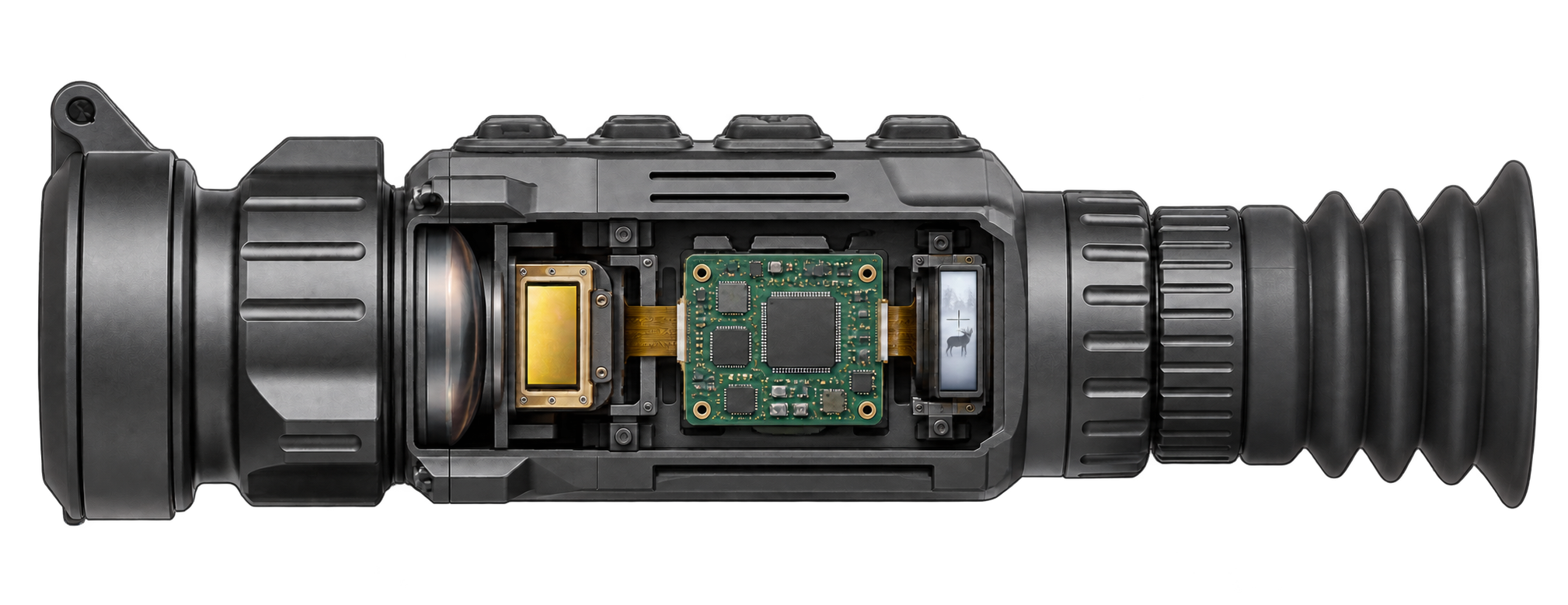
Inside a thermal scope
A thermal scope turns heat differences into a picture, so you can see animals even in the dark. Here’s how its main parts work together to make that happen.
Capture the scene
Create the image
Present it to your eye
The front lens collects infrared light, which we can’t see with our eyes, and directs it onto the sensor. You turn the front focus ring to sharpen the picture.
See the lens + sensor comparisonSources: Focal length · F-number · Focus controls
Lens + sensor
When people say a 640-class scope looks clearer, they may be describing a wider view, a longer lens, or both. Those upgrades change different parts of the picture.
Sensor upgrade
Keep the 35 mm lens and pixel pitch the same. The larger sensor records a wider crop, with the same number of pixels on the hog.
The wider picture can look finer because the hog and each sensor pixel appear smaller on the same-sized display. Crop back to the 384 view and enlarge it equally, and the hog has the same captured detail.
Lens upgrade
Keep the 640×512 sensor, pixel pitch and distance the same. At 100 yards, the longer lens projects a larger image of the hog onto the sensor.
Grid spacing enlarged for illustration.
A longer lens spreads the animal across more sensor pixels. When a 640-class scope also has a longer lens, it is easy to credit the sensor for a difference the lens made.
Display + eyepiece
Apparent FOV is how big the image looks to your eye. Think of watching the same football game on an 80″ TV instead of a 55″ TV, with your couch the same distance away.
50 mm · 640×512 · 12 µm
8.8° scene FOV
0.39″ display
1.03″ display
The eyepiece also affects apparent size. Apparent FOV is calculated from published FOV × base magnification, not measured through the eyepiece.
Magnification + zoom
Base magnification is your starting view. What happens next depends on where the enlargement takes place.
The lens, sensor, display and eyepiece set how big the scene looks before added zoom.
After capture
A crop of the captured picture fills the screen. The hog looks bigger, but uses the same captured pixels.
After capture
An adjustable eyepiece magnifies the display. Existing detail looks larger to your eye; the sensor captures no extra detail.
Before capture
Switching the front optics changes the capture. The longer setting puts more sensor pixels on the hog and shows less surrounding scene.
Two front-lens settings
Illustrative views · 640×512 sensor · 12 µm pitch · 100 yards. Ocular enlargement is schematic; the visible display area depends on the eyepiece.
Sensitivity · NETD
NETD measures thermal sensitivity in millikelvins (mK). The lower the number, the smaller the heat differences a scope can distinguish.
Reading the specs
Some brands publish sensor NETD, others system NETD. We identify which figure is listed before choosing what goes into the score.
A scope can have two NETD figures: one for the sensor, one for the complete system.
We score complete scopes, so we prefer the manufacturer’s system NETD when available.
Example manufacturer specs
We review specs and conflicts. Unlabeled NETD is treated as system NETD.
Use the system figure.
Use it as the scoring fallback.
Research an estimate.
ID Range
Detection asks whether something is there. Identification asks whether you can tell what it is. The distance depends on how much detail the scope captures.
Distinguish identifying features.
Distinguish its general form.
Spot a heat source.
The lens and viewing scale stay fixed in all three enlarged details.
35 mm lens · 640×512 · 12 µm
41.5 pixels across the reference target
Gold mark: 13-pixel ID threshold
27.6 pixels across the reference target
Gold mark: 13-pixel ID threshold
10.4 pixels across the reference target
Gold mark: 13-pixel ID threshold
One consistent comparison
We calculate where a 1.3 m dimension on the reference hog spans 13 sensor pixels. The lens and pixel pitch determine that distance.
AGM Rattler V2 35-640
319 yardsCalculated ID range
Manufacturer detection range answers a different question. Check the maker’s target size and conditions before comparing it with identification of our hog target.
Our range is a calculated comparison, not a guaranteed field result. Weather, contrast, processing and the observer also matter. These illustrative views do not validate the ID threshold.
Put it together
First the sensor adds surrounding scene. Then the longer lens trades some of that width for more pixels on the hog. Follow one change at a time.
Same hog · 100 yards · 12 µm pitch
384×288 sensor · 35 mm lens
Same hog area, enlarged equally
640×512 sensor · same 35 mm lens
Same hog area, enlarged equally
Same 640×512 sensor · 50 mm lens
Same hog area, enlarged equally
Compared with the starting scope: 8.8° instead of 7.5° FOV, with 43% more pixels across the hog. The combination matters more than either spec alone.
The lens and sensor set the capture. Sensitivity, processing and the display shape the finished picture.